










Are you constantly juggling different communication channels and tools to manage your wedding planning clients? Wouldn’t it be great to have everything in one place? That’s why creating a comprehensive client dashboard is essential for wedding planners. With this centralized hub, clients can easily access and manage important logistics – from guest lists to vendor contracts to timelines and more.
Not to mention, having a client dashboard allows for seamless communication and collaboration between you and your clients. A client dashboard is a perfect complement to a project management system like Asana. While project management tools are nice, they can’t truly recreate something like a wedding budget (yet). By providing this added level of convenience and organization, you’ll be able to elevate your client experience and build stronger relationships. Ultimately, this will lead to happier clients and more successful weddings.
Don’t want to trial and error your way through creating this yourself? I have a completely DFY option just sitting in my shop right now. I shared it with the members of the Planner’s Playbook a couple of months ago. So far, it has gotten RAVE reviews. If you have been looking for a way to ditch another pricey software OR you are starting from scratch, it has everything you need to jump from chaos to confidence. This easy-to-use client dashboard will help you stay organized while collaborating with your clients on everything from budget to Pinterest ideas. Friends don’t let friends do business the hard way, right?

Why Do You Need to Create a Client Dashboard as a Wedding Planner?
In case you are not convinced yet – creating a client dashboard as a wedding planner is essential when setting yourself up for success. It serves multiple purposes, from providing a great first impression to the couples that hired you and reassuring them that nothing will be missed on the wedding day. Having a client dashboard can also set you apart from other planners. It shows your ability to be organized and detailed-oriented visually (in a way your clients WILL appreciate).
On top of that, it also provides an easy way to communicate with your clients. You can efficiently share all information related to their wedding planning process. Imagine seeing budgets, timelines, venues, and vendors – without having to go through tedious back-and-forth emails. Essentially, your client dashboard acts as another checkpoint before the wedding day so that you can make sure everything is in place ahead of time and on schedule.
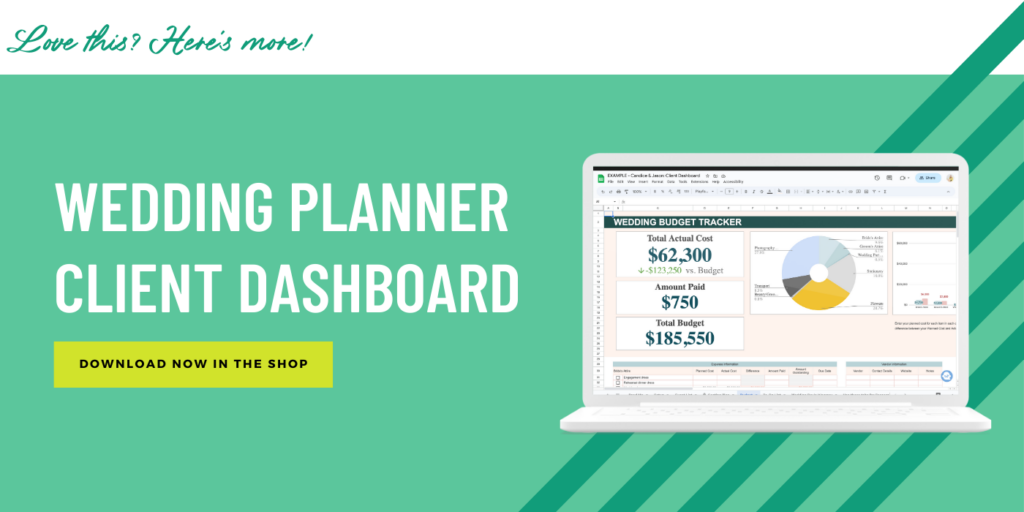
What Should Your Client Dashboard Include?
The Guest List + RSVP Tracking
Having a complete wedding guest list in your client dashboard is an absolute must-have to make the management of the RSVP process easier. Your clients will be able to have direct access to their guest list and can use it to track who has accepted or declined their invitation. In your client dashboard, they should be able to easily add and remove names from the list, as well as track any dietary restrictions or other special requests for each guest.
In addition, having an RSVP tracking feature in your client dashboard can help keep your clients organized and eliminate stress during all the planning stages leading up to the big day. When I set out to create a complete client dashboard for wedding planners, I also made sure to link up the guest list with the seating plan, to make it easier for couples to use and make sure that nobody is missed.
A Seating Plan
As a wedding planner, you know that creating a seating chart can be a daunting task. After all, everyone thinks it sounds like a fun activity until they sit down to create one, right? While you aren’t necessarily responsible for the actual seating chart, offering something easy to use in your client dashboard can make a big difference for your couples. By providing guidance and tools to simplify this important task, you can ensure that your clients have an enjoyable and stress-free wedding planning experience.
Wedding Budget
A wedding budget is crucial to the success of the event, and it’s the responsibility of a wedding planner to ensure that their clients stay within their financial limits – or at least, we are responsible for making sure they are AWARE when they go over their limit. Having a comprehensive budgeting tool in your client dashboard makes it easier to achieve this. A centralized wedding budget helps keep couples well-informed of each element of their wedding planning, including vendor costs, decor, and food. It’s up to you how detailed you want to get but when it comes to planning luxury weddings, I recommend getting VERY detailed.
In addition, the wedding budget in your client dashboard can also be used to document any changes in the plan. This helps the couples maintain an up-to-date view of their overall budget which trust me, they will appreciate. Most importantly, tracking the budget in real time can help clients make quick decisions while preventing overspending or the need to make last-minute changes. The effectiveness of this tool in reducing stress associated with wedding planning can’t be overemphasized!
Client To-Do’s
As a wedding planner, you know the inherent challenges that come with planning a big day. There are countless details and tasks to remember, and it can be overwhelming for couples. That’s why they hired you! With a personalized checklist of tasks, you can set them up for success. Plus, you’ll be making the process a whole lot easier. It not only helps the couple stay organized but also ensures that each and every detail will be taken care of, leaving you to focus on delivering the best possible event.
Wedding Day Itinerary
As a wedding planner, it’s important not to overload your client dashboard with too much information. With that said, there are some details that clients will definitely appreciate having at their fingertips. One example is the timeline of events for the wedding day. While you may share a lengthy document with your associate planning team, your couples do NOT want to see that. Instead, give clients the opportunity to provide their own plans. For example, when their photographer is expected to arrive or the first look with their dad. By offering this space for information gathering, you’ll be able to fine-tune your own planning and ensure that you’re able to provide the best possible service to your clients on their special day.
Venue Comparison
Starting your client dashboard by storing details of their chosen venue (and providing options to compare before finalizing a decision) is a crucial aspect for wedding planners. Understanding that each venue is unique and equipped with its own set of offerings, having all relevant info under one roof can help avoid confusion and undue stress. This way, planners can focus on their key responsibilities without fretting over the nitty-gritty details! A wedding venue is at the center of EVERYTHING so it should definitely be included.
Client Idea’s List
Who wants to be texted with random Pinterest ideas at all times of the day? Not me.
When it comes to creating a client’s wedding dashboard, it’s important to consider all their needs. From the big picture to the tiny details. That’s why including a designated spot where couples can save any ideas they come across during the wedding planning process is crucial. By having a dedicated place to store inspiration for their big day, you can help ensure that no details get overlooked and every moment is extra special! And hey – it might even save you from those random “look what I found” emails.

Using Google Drive for Your Client Dashboard
Listen – you are in Profit First territory here, and I believe Google Drive is not only the easiest platform to store and collaborate in your client dashboard, it’s also free (or the cost is VERY minimal for additional storage). When I set out to create the most comprehensive client dashboard template, I knew I wanted it to exist somewhere that wouldn’t be expensive for wedding planners to access and use.
Google Drive is also an ideal platform for your client dashboard because it’s familiar and easy to use. Your clients likely already use Google products for their personal or professional lives, so it’s one less thing to learn when they are planning their wedding. This familiarity with the platform can save time and energy that would otherwise be spent teaching couples how to use a new software.
Ready to Refine Your Current Client Dashboard?
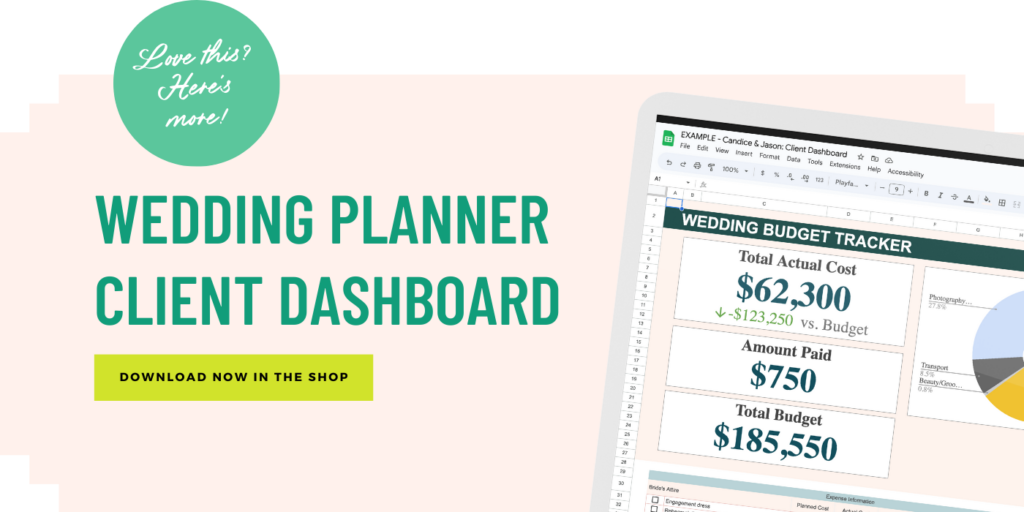
Are you feeling frustrated with the DIY approach to creating your own templates? Are you tired of paying a fortune each month for software that doesn’t seem to add enough value? As a former wedding planner (with over a decade of experience planning luxury events), I understand the challenges of staying organized and managing clients effectively. That’s why I created my own client dashboard template for wedding planners. This template has everything you need to efficiently manage and communicate with your clients, from tracking timelines to budget management. Stop struggling with mediocre tools – grab your copy here!
Ready to Refine Your Processes as a Wedding Planner? Join Us Inside Planner’s Playbook!
Are you looking for a community where you can connect with other wedding planners and hone your craft? I would love to invite you to join me in my wedding planner’s membership program – the Planner’s Playbook! Inside, not only will you have the opportunity to network with talented professionals like yourself, but you will also be provided with helpful resources to improve your skills! If you’re ready to take your wedding planning career to the next level, sign up now and get on the waitlist. We can’t wait to welcome you into our community of passionate excellence-orientated wedding planners!
Explore More Wedding Industry Resources
- Want to Book Better Clients? Stop Marketing and Improve Your Client Experience Instead
- How To Get Wedding Clients When You’re Just Starting Out
- 8 Steps to Spring Cleaning Your Wedding Business
- How To Start The Wedding Planning Process With Your Clients
- The 5 Stages of Scaling Your Wedding Business You Need to Know About
- How To Become A Wedding Planner With No Experience
- Top Networking Tips for Wedding Planners in 2023
- How To Avoid Wedding Season Burnout
- Honeybook Plans: Which Honeybook Plan Should You Choose For Your Business?
- How This One Thing Can Help You Avoid Burnout After Wedding Season
- What Is Analysis Paralysis, What Causes It & How To Overcome It
- 5 Time Management Tips & Secrets For Wedding Pros
For More Wedding Planner Business Secrets Follow Me On Instagram
Buying stuff regulates my nervous system 🤷🏼♀️

The dates on these photos represent the year I first started coaching each of these women. Some of these relationships are newer, and others go back YEARS.
And I NEVER take for granted how lucky I am to do this work.
To be invited into someone’s business, help her accomplish new things, navigate new challenges, make hard decisions, and push herself in ways she might not have thought possible is a PRIVILEGE.
Because the work we do together is about so much more than growing a business.
I think there’s a big difference between learning from someone and having someone as a constant in your life. Someone who knows your business, history, understands what you’re working toward, and can be both a coach and a confidant through all the different seasons of entrepreneurship.
That’s what I get to be for these women. And what makes it even more special is that we’ve built a community of women who genuinely want to stick around. Not just for me, but for each other.
I feel so incredibly fortunate that these women continue to invite me into their businesses, year after year. It’s a privilege I don’t take lightly.
If you’ve been looking for a business coach who can be that person for you, I’d love to invite you to come hang out with us.
Applications for WeddingPro Insiders are open, and I have a handful of spots available.
Maybe next year, we’ll get to add your picture to this wall, too!!
Learn more and apply at weddingproinsiders.com
Photography @c10ike !!!
We don’t know where that energy has been, and frankly, I’m not taking any chances.
Before you move your wedding planning business to Cue, we’ll be conducting a brief spiritual background check on your laptop. The dogs are licensed. Please cooperate.
Comment CUEWAITLIST and I’ll send you the link to join the waitlist. Cleansing included.
filed under:




















+ show Comments
- Hide Comments
add a comment